 Joe McCraw
The problem
Reviewing native Apple interfaces is still frustratingly visual and manual. Developers spend hours booting simulator matrices, taking screenshots, and trying to reconcile what appears visually with what VoiceOver actually speaks. For AI coding agents, taking and passing raw screenshots eats up massive multimodal token context without actually explaining whether an accessibility node is missing, clipped, or untappable.
Layout failures also span multiple layers: a custom control can look gorgeous on canvas but completely lack accessibility traits; a text element can look fine at standard sizes but truncate severely under Dynamic Type; or an interactive element might be invisible to screen readers entirely.
The solution
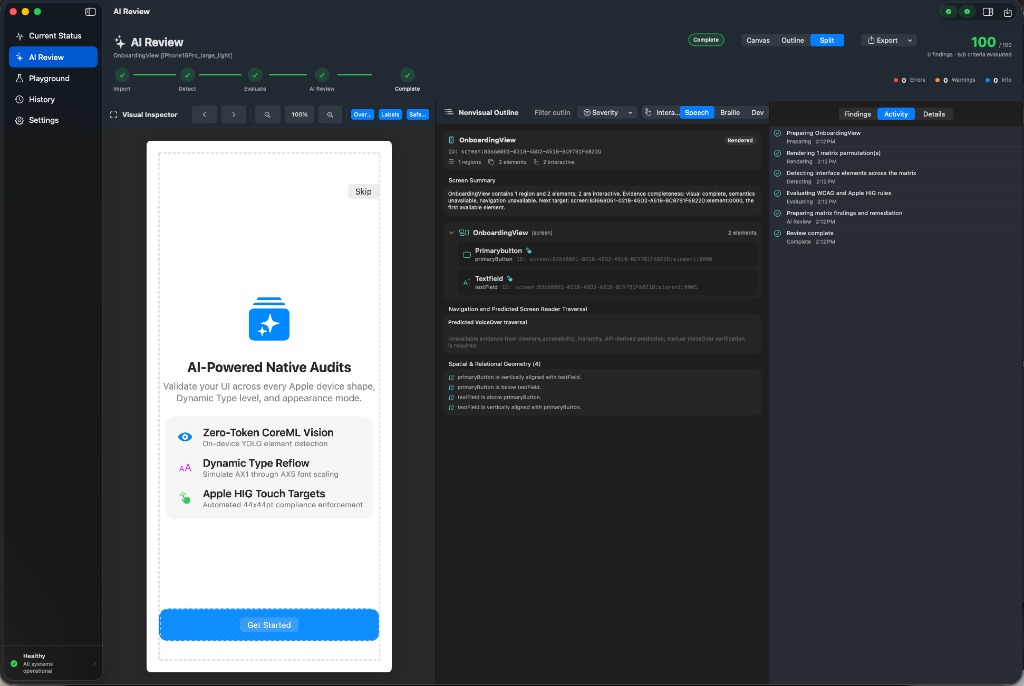
I built ViewLens as a standalone native macOS CLI tool and Model Context Protocol (MCP) server written in pure Swift. It bridges visual rendering, Auto Layout geometry, and accessibility hierarchies into compact, structured JSON that both developers and coding agents can query instantly.
Rather than relying on screenshots alone, ViewLens evaluates two complementary layers:
- Structural evidence: Native SwiftUI and UIKit view hierarchies, Auto Layout frames, and accessibility node semantics.
- Visual evidence: On-device CoreML vision detection and deterministic Apple HIG rules (checking touch targets ≥44×44pt, contrast ratios, and clipping).
The result is compact JSON describing elements, bounds, roles, relationships, and findings. That makes the system useful without requiring every review to upload raw application imagery to an external multimodal service.
Architecture
The local visual detection layer uses NativeUIAuditKit (NUIAK), a companion project providing trained Apple UI models and structured screenshot observations.
- Pure-Swift MCP server:
viewlens mcpruns an in-process JSON-RPC server over standard input/output, allowing compatible coding tools to request audits and structured UI information. - Dual-tier rendering: SwiftUI templates render in process through
ImageRenderer; UIKit views use a Mac Catalyst harness with the real UIKit and Auto Layout engines. A simulator host remains available for platform-specific reference behavior. - Layered diagnostics: programmatic ambiguity and accessibility probes are correlated with local CoreML detections and deterministic Apple HIG rules for targets, overlap, clipping, and truncation.
- Nonvisual screen model: stable element identifiers, hierarchy queries, spatial relationships, predicted VoiceOver order, braille-oriented output, and focus-graph analysis expose interface structure without requiring visual inspection.
- Automation surfaces: the same engine supports individual screenshot scans, directory batches, device and Dynamic Type matrices, design diffs, pre-commit hooks, pull-request summaries, and MCP tool calls.
Accessibility as a first-class authoring surface
Accessibility isn’t an afterthought or a compliance checklist at the end of a sprint. In ViewLens, nonvisual inspection is treated as a primary way to understand interface structure.
The tool provides commands to query spatial relationships (what is above, below, or inside an element), inspect VoiceOver speech sequences and rotor groups, simulate braille displays, and catch focus traps before shipping. It flags when a visible button lacks semantic roles, or conversely when an accessibility element exists whose visual pixels are clipped or invisible.
Clear engineering boundaries
ViewLens is explicit about what it can and cannot prove. A pure screenshot audit can check pixel geometry and contrast, but it cannot guarantee programmatic accessibility actions or VoiceOver traits. Whenever evidence is insufficient, ViewLens reports the rule as unverified rather than giving a false pass.
Why it matters
By combining visual inspection, accessibility semantics, and agent automation into a single CLI and MCP server, ViewLens makes UI review faster for developers and accessible to blind or low-vision engineers—while giving AI coding agents the structured spatial context they need to write solid native code.
Status
Active open-source project on GitHub targeting macOS 15 and newer, written in Swift, and distributed under the MIT License.