 Joe McCraw
Giving screenshots structure
A screenshot shows an interface, but it doesn’t tell a developer which regions are buttons, where a text field begins, or which Apple TV control has focus. Those details matter when diagnosing layout problems, reviewing accessibility, or helping a coding agent understand what an app actually rendered.
NativeUIAuditKit—NUIAK—is my Swift toolkit for turning native Apple screenshots into structured observations. It combines local CoreML detection with Apple’s Vision framework, giving downstream tools element types, confidence scores, bounding boxes, and supporting evidence they can inspect programmatically.
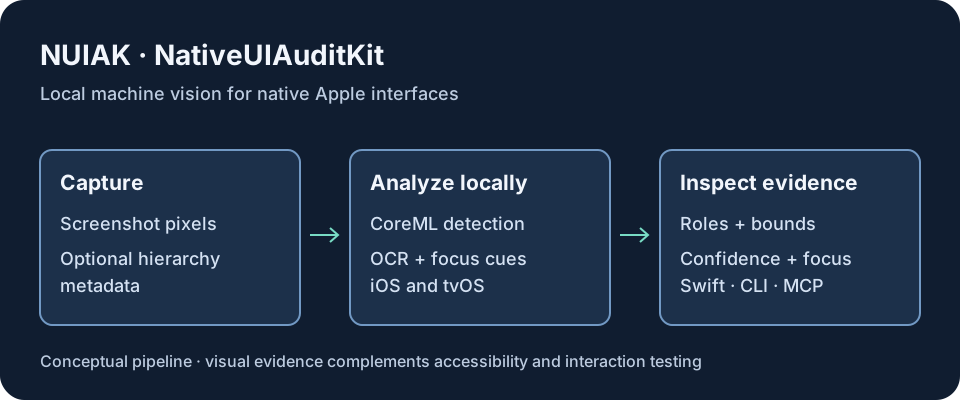
Features worth highlighting
Local inference for fast inspection
The detector runs through CoreML on Apple hardware. Applications can inspect screenshots locally without sending them to a hosted vision service. Versioned model metadata supplies class labels and input expectations, so integrations can work with an explicit model contract.
Apple TV focus awareness
On television, recognizing the selected control is as important as finding the control itself. NUIAK’s tvOS pipeline combines element detection with visual focus cues such as expansion, brightness, and borders. An optional second-stage focus classifier examines detected crops. That makes focus state available as structured evidence for remote-driven interfaces.
Useful with or without capture metadata
Pixel-only inspection works with existing screenshots. When a capture includes hierarchy metadata, sidecar mode adds structural context. Observations expose bounds in normalized, pixel, and point coordinates; OCR fusion adds visible text, while audit checks surface potential clipping, overlap, truncation, and small touch targets.
Multiple ways to integrate
- Swift library: use the Vision-style request API to obtain typed observations.
- Model-only package: bring your own inference pipeline while reusing trained models and their metadata.
- CLI and MCP server: inspect screenshots from development workflows and compatible agent tools without building a new Swift application.
ViewLens uses NUIAK’s model package. NUIAK provides the visual detection layer; ViewLens builds a broader interface-review experience around visual and structural evidence.
Measured results, with context
The repository reports these results for its shipped detectors:
| Detector | Coverage | Reported validation mAP@0.5 |
|---|---|---|
| iOS v2.0 | Five classes: alerts, navigation bars, primary buttons, text fields, and toggles | 0.935 for the CoreML export |
| tvOS v3.0 | 25 active UI classes | 0.9822 |
The iOS result uses 1,394 held-out validation images. The repository also documents physical-device inference benchmarks and Apple TV hardware qualification. These are model- and dataset-specific measurements—not a claim that every unfamiliar app will achieve the same result. mAP measures detection performance; it is not an accessibility compliance score.
See the model performance evidence for evaluation conditions and detailed results.
Engineering boundaries
A visually detected button does not prove that VoiceOver can reach it or that its action works. Screenshot evidence complements accessibility-tree inspection and interaction testing; it cannot replace them.
The public repository distinguishes shipped iOS and tvOS detectors from ongoing work on broader iOS coverage, improved focus classification, and a planned macOS detector. The preview runtime and model-download work are not presented here as finished releases. Model redistribution also has its own licensing considerations; consult the repository before bundling weights into another product.
Explore the project
Start with the repository, the CLI and MCP guide, or the product roadmap.